Rankar Suite · Domain Intel

One web site box.Your whole search picture.

Type in any site. RankSpy scans it. You get key words, rivals, ads, links, site health and AI search in one report. It takes about 40 seconds.

Run a free scanSee the tour
Live search dataMeta Ad LibraryReal crawl dataAI answer botsBoard-ready PDF
The brain of the Rankar suite. Each scan is shared with RankBridge and RankAI, so you work on one site view. See the ecosystem
app.rankar.ai / rankspy — live scan of stripe.comLive product

Unedited capture: enter a domain, watch the scan modules resolve, read the dossier.

11
Scan parts
3,000
Key words per scan
~40s
Time per report
18
Country markets
What is RankSpy

The brain of the Rankar suite

RankSpy is a site research tool. You give it one site. It can be yours, a client's or a rival's. You get one clear report. It covers free search, ads, links, rivals, tech health and AI search.

We built it for one reason. The answer to "how strong is this site?" is normally spread across four tools and a sheet. RankSpy grabs it all in one pass. It lines the data up in one view. Then it hands the view to the rest of the suite.

What makes it different
  • True DR from 0 to 100, from the index, not a made-up score
  • Named faults, not quiet zeros. We do not fill gaps with guesses.
  • Search ads and Meta ads in the same view
  • An AI search score next to your old SEO stats
  • Each scan is saved, so you can open it and see what moved

What it does

It runs eleven checks at once on any public site. Then it builds eight linked parts: overview, free search, rivals and gaps, ads, links, AI search, tech SEO and a board report.

The problem it fixes

Search data is split across key word tools, link tools, ad spies and crawlers. Each one makes up its own score. RankSpy gives you one view, from one scan, at one point in time.

Who it is for

Agencies sizing up leads. In-house and solo SEOs who track key words. Affiliates who size a niche. Shops that check how well their best pages show up.

Why it sits in Rankar

RankSpy does the thinking. Its link view opens in RankBridge for outreach. Its AI notes open in RankAI for quote checks. You never type the site twice.

Product showcase

The tool, just as you get it

A full report for stripe.com. Key stats, a trend chart, rank moves, key word tables and part status. All from one scan.

Scan your site
11
Checks at once
8
Linked report parts
3,000
Key words per scan
18
Country markets
~40s
Time per report
0–100
DR and AI scales

We show no logos and no quotes here. We do not post ones we cannot prove.

See every screen in the tour
The problem

SEO research takes five tabs and a guess

Each tool holds one slice of the truth. You glue them by hand. That is where the hours go. That is where the errors come from.

Five tools, one question

You pay for four tools just to ask one thing. How strong is this site?

Numbers that clash

Each brand makes up its own score. So the deck and the app do not match.

Quiet blanks

When a tool fails, most apps print a zero. You find out in the meeting.

No AI search view

AI bots send buyers now. Old tools do not tell you if they quote you.

Why RankSpy

One place for search data, not five

RankSpy is the brain of the Rankar suite. It pulls free search, ad, link, tech and AI data for a site. Then it turns that into a choice you can make.

All the search data in one place

See where a site really stands. No need to glue files.

DR, free traffic, key words, link sites, ad spend and tech health all come from one scan. They are all from the same moment. So the numbers agree.

  • One scan, eight linked parts
  • One view, one point in time
  • Open an old scan and compare

One place to work

Fewer tabs. Fewer bills. One place to start.

Key words, rivals, ads, links and crawls all sit behind one box. Need to go deep? RankSpy hands the same site to RankBridge for links and RankAI for AI checks.

  • One box in place of four tools
  • One shared view across the suite
  • Named faults, not quiet zeros

Made to act on

Leave each scan with a ranked list of what to fix.

You get gap words a rival wins, page issues sorted by risk, AI fixes sorted by value, and a board report with a 30/60/90 plan. Save it as a PDF.

  • Ranked key word and gap wins
  • Grouped tech issues with URLs
  • Board report and PDF export
Platform · 8 linked parts

Every side of a site, in one report

Each part stands on its own. It has its own source and its own retry. As a set, they show what a site ranks for, what it buys, who beats it and what is broken.

Site Overview

One screen. DR from 0 to 100, free traffic, key word count, links, link sites, traffic value, spam score and a 12-month trend. It also shows which ranks went up, down, in or out.

  • True DR, not a made-up score
  • Brand and non-brand traffic split
  • Country mix and SERP feature mix

Free Search Research

See every key word the site ranks for. Each row shows rank, volume, cost per click, intent and the page that ranks. Filter it, sort it, and save it as CSV.

  • Rank and intent charts
  • Live SERP check per key word
  • Top free-traffic pages

Rivals & Gaps

See your rivals, ranked by how many key words you share. Compare two sites side by side. Then read the gap list: the words they win and you do not.

  • Shared key word scoring
  • Site vs site compare
  • Gaps in a ranked list

Ad Research

See the Google ads a site buys, with cost, rank and live ad text. Meta ads sit next to them. So search and social spend show up in one view.

  • Paid key words and paid traffic
  • Real ads and landing pages
  • Ad spend per month

Link Strength

A fast read on links. Total links, link sites, new and lost links, anchor text and DR. Deep link work moves to RankBridge.

  • Link site quality bands
  • Anchor text mix
  • New and lost links

AI Search Fitness

A score from 0 to 100 for how well AI bots can use your site. It checks bot access, page data, clear text and quotable content. Fixes come ranked by value.

  • AI bot and robots checks
  • Page data and schema
  • Answer score per page

Tech SEO & Stack

Real crawl data. Status codes, titles, meta text, headings, canonical tags and index rules. You also see the CMS, code, trackers and pixels the site runs.

  • Issues grouped by type
  • Tech and pixel check
  • Index and canonical audit

Board Report

Every part boiled down for your boss or client. Key numbers, findings, risks and a ranked plan. Save it as a PDF.

  • Written from real scan data
  • Ranked 30/60/90 plan
  • PDF in one click
What it can do

Six jobs, one scan behind them all

Each one below is a part of the report. You can see them in the tour just below.

Site overview

Read a site in one screen

DR, free traffic, key word count, links, link sites, traffic value and spam score all come from one scan. So they agree. Next to them sits a 12-month trend and the ranks that went up, down, in or out. You also see brand and non-brand traffic, plus the top countries.

Size up any site in the first thirty seconds.

0–100
True DR
12 mo
Trend
18
Markets
  • Brand and non-brand split
  • SERP feature mix
  • Rank move groups
Free search

Every ranked key word, not a sample

Up to 3,000 key words per scan. Each row has rank, volume, cost per click, how hard it is, traffic share, intent and the page that ranks. Filter by intent or rank. Sort any column. Save it all to CSV. Click a word to pull a live check of that search page.

Go from "they rank well" to the exact words, pages and volumes.

3,000
Words per scan
Live
SERP check
CSV
Export
  • Rank and intent charts
  • Top pages by traffic
  • SERP detail per word
Rivals and gaps

See who wins the words you miss

We rank your rivals by how many words you share. Then we put them side by side with your site. The gap list shows the words a rival wins and you do not. The ones you can win rise to the top.

Turn rival research into a ranked list of words to take.

Shared
Rival score
1:1
Side by side
Gap
Win list
  • Shared word scoring
  • Site vs site compare
  • Ranked gap wins
Ad research

Search and social spend in one view

Google paid words come with cost, rank and the live ad text. Meta ads sit right next to them. So search and social spend show up together. You also see landing pages and a guess at spend each month.

Know what a rival buys before you set a bid.

Google
Paid words
Meta
Ad Library
Spend
Per month
  • Paid words and paid traffic
  • Real ads and landing pages
  • Tables you can filter
AI search

Score how well AI bots can use your site

A score from 0 to 100. It looks at bot access, page data, clear text and content worth quoting. Each failed check is spelled out and ranked by value. Deeper quote tracking goes to RankAI, with the same site view.

Cover the one channel old SEO tools skip.

0–100
AI score
Robots
Bot access
Schema
Page data
  • AI bot and robots checks
  • Page data and schema
  • Answer score per page
Tech SEO

Real crawl data, sorted by what to fix

Status codes, titles, meta text, headings, canonical tags and index rules come from a live crawl. They are grouped by issue, with the URLs hit by each one. Next to that sits the CMS, code, trackers and pixels the site runs.

Walk into the call knowing the site's tech debt.

Crawl
Live, not old
Grouped
By issue
Stack
Tech check
  • Index and canonical audit
  • Issues grouped by risk
  • CMS, code and pixel check
Open in RankSpy
From data to action

Five steps from a box to a choice

RankSpy works the way you work. Each step feeds the next. The last one closes the loop. It puts the new scan next to the old one.

01

Find

Type any public site, sub site, folder or URL. Pick one of 18 markets, on desk or phone.

Eleven parts start
02

Study

Read eight linked parts, all from one scan: free search, ads, links, rivals, tech and AI.

One clean report
03

Spot wins

Gap words your rivals win, page issues sorted by risk, and AI fixes sorted by value.

A ranked win list
04

Act

Save words to CSV. Send links to RankBridge. Send AI notes to RankAI. Ship the PDF.

Work in the right tool
05

Track

Scans are saved. Open one, run the site again, and read what moved.

Run to run change
How it works

Domain in, dossier out — about forty seconds

No connectors, no tracking scripts, no data import. RankSpy works on any domain on the internet, including the ones you do not own.

01

Type a site

Use a root site, sub site, folder or full URL. Then pick one of 18 markets, on desk or phone.

02

The scan runs

Eleven parts run at once. Crawl, key words, links, rivals, ads, trends, markets and gaps. Each one shows its state live.

03

Read the report

Eight linked parts, built from real data. Each number has a source. If a part fails, it says so.

04

Act on it

Save key words to CSV. Send links to RankBridge. Send AI notes to RankAI. Save the report as a PDF.

See the finished report
Guided tour · 3 real screens

Click a marker to see what it does

Raw captures of RankSpy running on stripe.com. Pick a screen, then click a numbered marker on it to read what that part of the app tells you.

Run your own scan
How to read it

Numbered dots sit on the real screen. Click one to read what that element does.
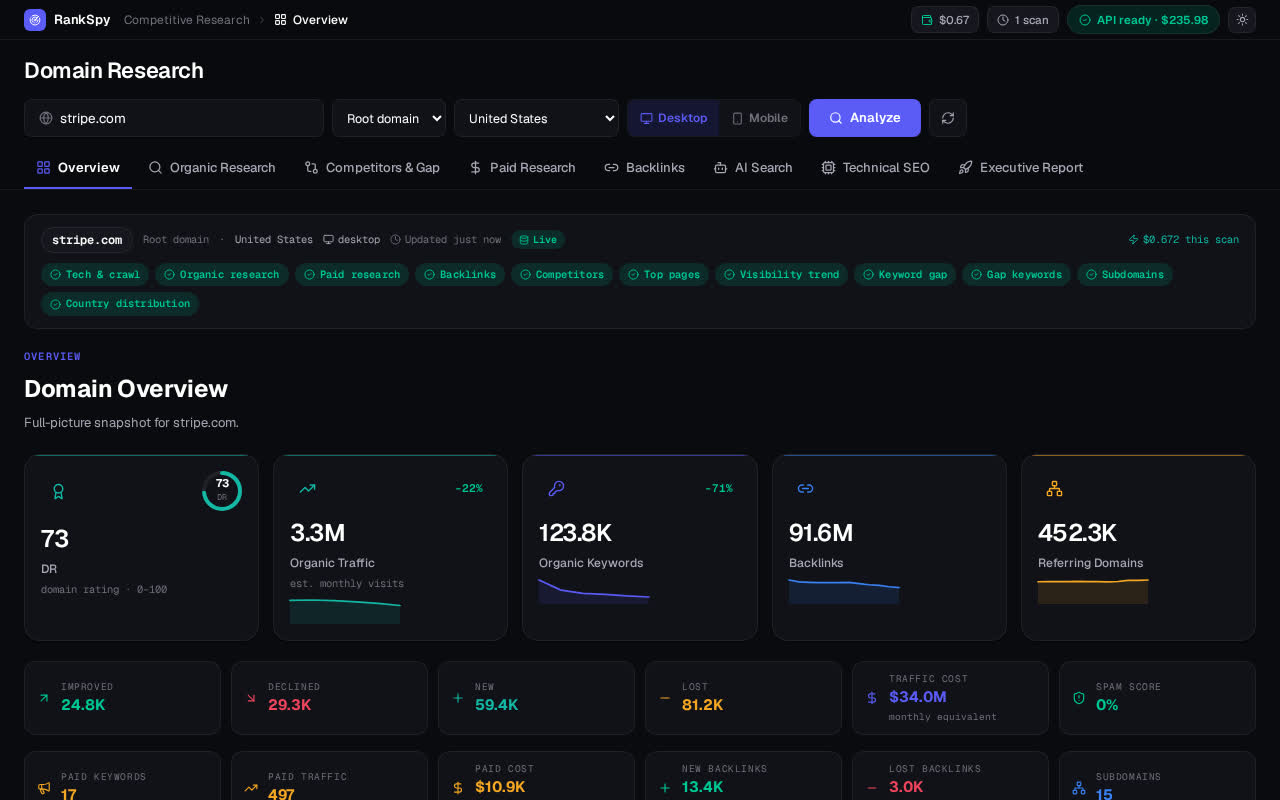
app.rankar.ai / rankspy / overview — stripe.comLive product
RankSpy Site Overview view for stripe.com
1DR from 0 to 100, from the index
DR, traffic, key words, links and link sites. With 12-month charts and rank moves. This is a live scan of stripe.com.
Open Site Overview
Data you can trust

Numbers you can stand behind

Most tools fill gaps with made-up means. We would rather show you nothing than show you a lie.

No fake numbers

If a part fails, the app says so by name. A zero is never sold as insight.

Clear data source

A live chip shows if the data feed is up, and what is left in your budget. Each scan shows its cost.

Parts you can trace

Each part has a name and you can retry it. One fault does not spoil the whole report.

Saved and re-run

Scans are saved. Open one again, run it fresh, and read what moved.

Compare

RankSpy next to the glued-up stack

Dimension
Old stack
RankSpy
Time to a full view
Half a day in four tools
One box, about 40 seconds
Strength score
A made-up score per brand
True DR, 0 to 100, from the index
Paid view
Search ads only. Social costs more.
Google ads plus Meta Ad Library
AI search
Not there
A 0 to 100 score, with fixes
If a part fails
Blank cells and quiet zeros
It says which part failed. You retry it.
What you hand over
A hand-made sheet and slides
A written report. One click to PDF.
Who it is for

Built for people who must prove the number

One scan, many jobs. Each line below is a thing the tool does today.

SEO agencies

Size up a lead before the call. Walk in with their gap words, ad spend and tech debt on the page. We charge by scan, so five pitches a week does not mean five seats.

In-house SEO teams

Track your key words, rank moves and AI search fitness in one place. Run the same site again and read what moved. No need to build a new report each month.

Freelancers

Hand over a clean PDF built from real scan data. It has findings, risks and a 30/60/90 plan. No hand-made sheet.

Affiliate marketers

Size a niche fast. See the words the big sites win, what they pay for on Google and Meta, and where their link strength comes from.

Shops and stores

Check how well the pages that sell show up. See ranked URLs, index state, canonical tags and the SERP spots your class is losing.

Content and AI leads

Score how quotable your pages are to AI bots. Fix bot access and page data. Then hand the watch job to RankAI.

Not sure which of these you are? Scan a domain you already know well and check the dossier against what you expect.

Run a free scan
One suite, one flow

Stop building the picture by hand

The point is not a longer feature list. The point is where the work takes place. On the left: five tools that share nothing. On the right: one house where the scan is the shared view.

Split stack
Lots of SEO bills
Lots of dashboards
Files all over
Hand-made math
A sheet no one trusts
Rankar suite
Rankar suite
RankSpy — the brain
RankBridge and RankAI
One shared site view
A report you can stand behind
The Rankar suite

RankSpy finds it. The suite fixes it.

Rankar is one house with three tools. RankSpy sits in the middle and does the thinking. Each scan it runs feeds the other two. So you never type the same site twice.

RankSpy
Central intelligence
RankBridge
Connected tool
RankAI
Connected tool

One ecosystem → specialised tools → one workflow. RankSpy holds the domain context; the others act on it.

RankSpyYou are here

Site data and rival research. Key words, rivals, ads, links, tech and AI fitness.

RankBridgeHand off

Link building and outreach. It takes the link view RankSpy builds and turns it into a campaign.

RankAIHand off

AI search checks. It watches if the pages RankSpy scores well really do get quoted.

The site view flows one way. RankSpy scans. Its link list opens in RankBridge. Its AI notes open in RankAI. Same site, no re-import.

Run a free scan
Access

Start free. Grow in the suite.

RankSpy is paid by the scan. There is nothing to set up. You see real data first.

Free scanNo sign-up

Point RankSpy at any site. Read the whole report.

  • All 8 report parts
  • Live search data
  • CSV key word export
Rankar suiteBest value

RankSpy plus RankBridge and RankAI. They fix and watch the rest.

  • Link outreach in RankBridge
  • AI quote checks in RankAI
  • One shared site view
Agency volumeTalk to us

More scans for teams who pitch a lot each week.

  • Bulk and repeat scans
  • PDF reports at scale
  • First call on capacity
FAQ

Straight answers

What is RankSpy?

RankSpy is the site research tool in the Rankar suite. Type in any public site. It runs eleven checks at once: crawl, key words, links, rivals, ads, trends, markets and gaps. Then it builds eight linked report parts.

What jobs can I do in RankSpy?

Size up a site. Do key word research. Study rivals and gaps. Check Google and Meta ads. Read link strength. Crawl the site. Score AI search fitness. Then save it all to CSV or PDF.

Can I work on many client sites?

Yes. We charge by scan, not by seat. Each scan is saved, so you can open a client report, run it again later and put the two runs side by side.

Does it help me act, not just read?

Yes. Each part ends in a next step: gap words ranked by what you can win, page issues sorted by risk with the URLs, AI fixes sorted by value, and a board report with a 30/60/90 plan.

Where does the data come from?

Key words, links, rivals and ad data come from a live search index. Social ads come from the Meta Ad Library. Tech and AI checks come from a live crawl of the site. None of it is faked.

How long does a scan take?

About 40 seconds for the full report. The parts run at once, so each one shows up as soon as it is done.

How many key words do I get?

Up to 3,000 per scan. Each row has rank, volume, cost per click, intent, traffic share and the page that ranks. You can filter, sort and save it all to CSV.

What is DR?

DR means Domain Rating. It runs from 0 to 100. We take it straight from the search index. We do not make up our own score.

Can I compare two sites?

Yes. The Rivals part has a side by side view. It also lists the words a rival wins and you do not.

Does it cover AI search?

Yes. The AI part scores bot access, page data and how well your text answers a question. Deeper quote tracking goes to RankAI.

Which markets can I pick?

Eighteen. The US, UK, Canada, Australia, Germany, France, Spain, Italy, the Netherlands, Sweden, Brazil, Mexico, India, Pakistan, the UAE, Singapore, South Africa and Japan. On desk or phone.

Can I export the data?

Yes. Key word tables save to CSV. The board report saves to PDF, with its charts and plan.

How does it fit the Rankar suite?

RankSpy does the thinking. It builds the site view: key words, rivals, ads, links, tech and AI fitness. Then it hands that view to RankBridge and RankAI. You never type the site twice.

Can I scan many client sites?

Yes. We charge by scan, not by seat. Each scan is saved, so you can open it later, run it again and see what moved.

Do I need to install a thing?

No. There is no code to add and no proof of ownership. It works on any public site, even one you do not own.

Rankar suite · RankSpy

Bring your search workflow into one central workspace

No set-up. No import. No sheet. One box, one scan, one report.