
Create Winning Guest Posts - Collaborate, Write & Grow with RankWriter Pro
RankWriter Pro is a powerful tool that simplifies the process of creating high-quality guest posting content. Whether you're working on guest post articles,...
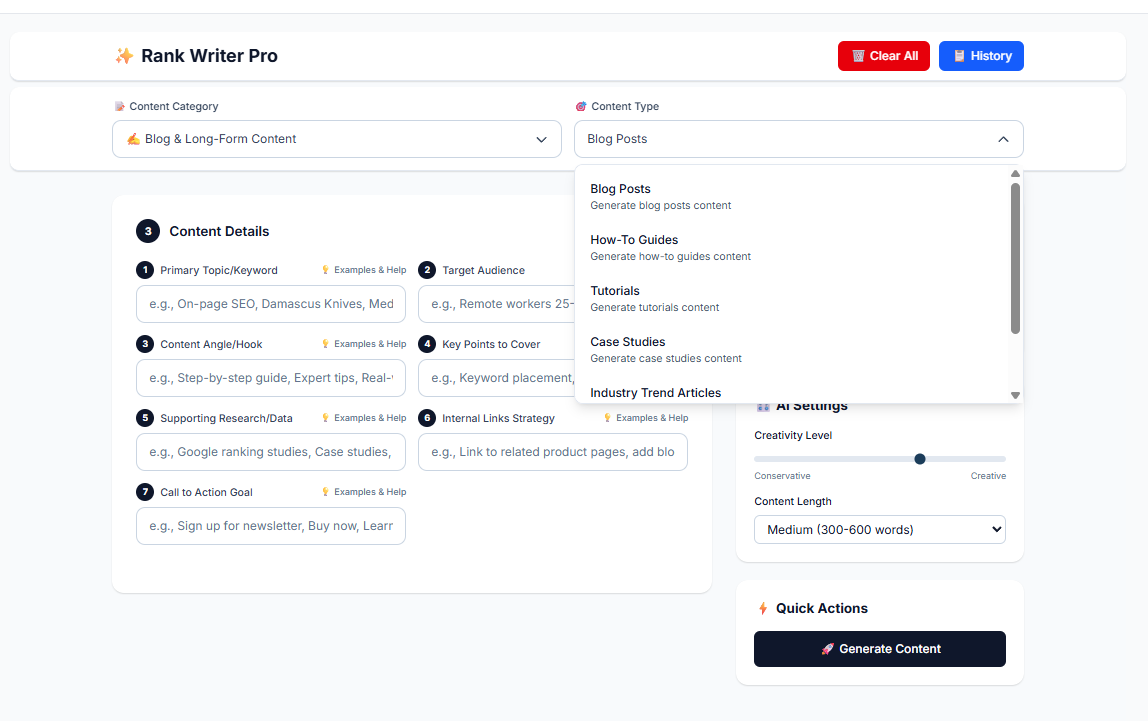
RankWriter Pro is a powerful tool that simplifies the process of creating high-quality guest posting content. Whether you're working on guest post articles, outreach emails, author bios, or link-building strategies, RankWriter Pro helps you generate optimized content that supports your SEO goals and outreach efforts. Here’s how to effectively use RankWriter Pro for Guest Posting Content.
1. Selecting the Guest Posting Content Category
To begin using RankWriter Pro for guest posting, start by selecting the Guest Posting Content category. This category includes several content types that help you craft comprehensive guest posting strategies. The available content types are:
Content Type | Description |
Guest Post Articles | Generate well-researched articles for guest posting opportunities on external websites. |
Guest Post Ideas | Get a list of relevant guest post topic ideas tailored to your niche and target websites. |
Outreach Emails | Create personalized outreach emails to pitch your guest posts to site owners and bloggers. |
Author Bios | Generate author bios that effectively showcase your expertise and encourage backlinks. |
Link-Building Anchor Text | Create optimized anchor text for linking to relevant pages within your guest posts. |
Follow-up Templates | Craft polite and professional follow-up emails to ensure your guest post pitches get noticed. |
2. Filling in Content Details
Once you’ve selected the appropriate content type, it’s time to fill in the relevant details to guide the AI in generating content. Here’s a breakdown of what you need to input:
Guest Post Articles
Primary Topic/Keyword: Choose the main topic of your guest post. This could be an industry-related keyword or subject such as “SEO strategies for beginners” or “How to optimize your website for better performance.”
Target Audience: Define who you are writing for, whether it's marketers, bloggers, business owners, or another specific audience.
Content Angle/Hook: Provide the angle or unique approach of your post, such as step-by-step guides, case studies, or expert tips. This ensures the content stands out.
Key Points to Cover: List important points you want the article to cover. These might include insights, examples, or specific strategies related to the main topic.
Guest Post Ideas
Industry/Topic: Define the industry or niche you're focusing on. For example, “digital marketing,” “fitness,” or “sustainable fashion.”
Target Website Type: Specify the type of websites you're aiming to pitch your guest posts to, such as eCommerce blogs, industry news sites, or personal finance websites.
Outreach Emails
Primary Goal: Define the purpose of your outreach email, whether it’s to propose a guest post or ask for a backlink.
Recipient’s Website/Blog: Input the website you’re targeting for guest posting to tailor your pitch.
Tone/Style: Choose whether your email should be formal, casual, or professional based on the recipient.
Author Bios
Author Information: Include your name, profession, and expertise. For example, “John Doe is a digital marketing expert with 10+ years of experience in SEO and content strategy.”
Website/Link: Include your website or blog link to direct readers to your content.
Credentials: Mention any relevant credentials or achievements that can add authority to your bio, such as awards, certifications, or notable publications.
Link-Building Anchor Text
Target Keywords: Enter the keywords you want to target with anchor text. For instance, if your post is about SEO, keywords like “SEO tips” or “SEO for beginners” can be used as anchor text.
Internal Pages: Specify the pages or posts on your website you want to link to from the guest post.
Follow-up Templates
Follow-up Purpose: Specify whether the follow-up is to remind the recipient, ask for feedback, or re-pitch the guest post.
Tone/Style: Choose the tone of your follow-up email, whether it's polite, friendly, or formal.
3. AI Settings: Adjusting Content Generation
RankWriter Pro provides flexibility in how you want your content to be generated by offering the following settings:
Creativity Level: Adjust the creativity slider between Conservative (more structured) and Creative (more flexible). For a straightforward guest post article or outreach email, a Conservative approach may work best, while more creative pitches or articles might benefit from the Creative setting.
Content Length: For guest post articles, the typical length should be Medium (300-600 words), but this can be adjusted depending on the platform or the type of post.
4. Generating Content
After entering all the required details and adjusting your AI settings, click on Generate Content. RankWriter Pro will use the provided inputs to generate your guest post articles, outreach emails, author bios, and more.
For Guest Post Articles: You’ll receive a comprehensive, well-structured article ready to be pitched to your target websites.
For Outreach Emails: The AI will generate a personalized, compelling email that you can send to potential guest post hosts.
For Author Bios: You’ll get a concise yet informative bio that highlights your expertise and encourages backlinks.
For Link-Building Anchor Text: The tool will suggest optimized anchor text to use within your guest posts, ensuring your links are SEO-friendly.
5. Review and Edit
Once RankWriter Pro generates the content, it’s essential to review and refine it. While the AI does an excellent job of generating content, editing ensures it aligns perfectly with your voice and campaign goals. Pay attention to the following:
Clarity: Does the content clearly convey your message and showcase your expertise?
SEO Optimization: Are the keywords used correctly and naturally in the content? Are the links well-placed?
Engagement: Does the outreach email sound genuine and personalized? Does the guest post article offer value to readers?
6. Benefits of Using RankWriter Pro for Guest Posting Content
Using RankWriter Pro for guest posting offers several advantages:
Benefit | Explanation |
Time Efficiency | Quickly generate high-quality guest post content and outreach emails, saving time in the pitching process. |
Personalization | Tailor the content for different niches, websites, and audiences, ensuring relevance. |
SEO Optimization | Generate content optimized for SEO, helping to build high-quality backlinks. |
Consistency | Maintain a consistent voice and message across all outreach and guest posts. |
Improved Link Building | Leverage AI-generated anchor text and content to improve your link-building strategy. |
Conclusion
RankWriter Pro makes the process of guest posting more efficient and effective. Whether you’re generating guest post articles, outreach emails, author bios, or link-building anchor text, RankWriter Pro provides a streamlined approach to crafting content that resonates with your target audience and helps achieve your SEO objectives. By following the steps outlined above, you can improve your guest posting efforts and build high-quality backlinks that drive traffic and enhance your website’s SEO performance.