
Master the Art of Blogging - Transform Ideas into Powerful Posts with RankWriter Pro
RankWriter Pro is an advanced content generation tool that helps streamline the process of creating engaging blog posts, tutorials, case studies, and industry...
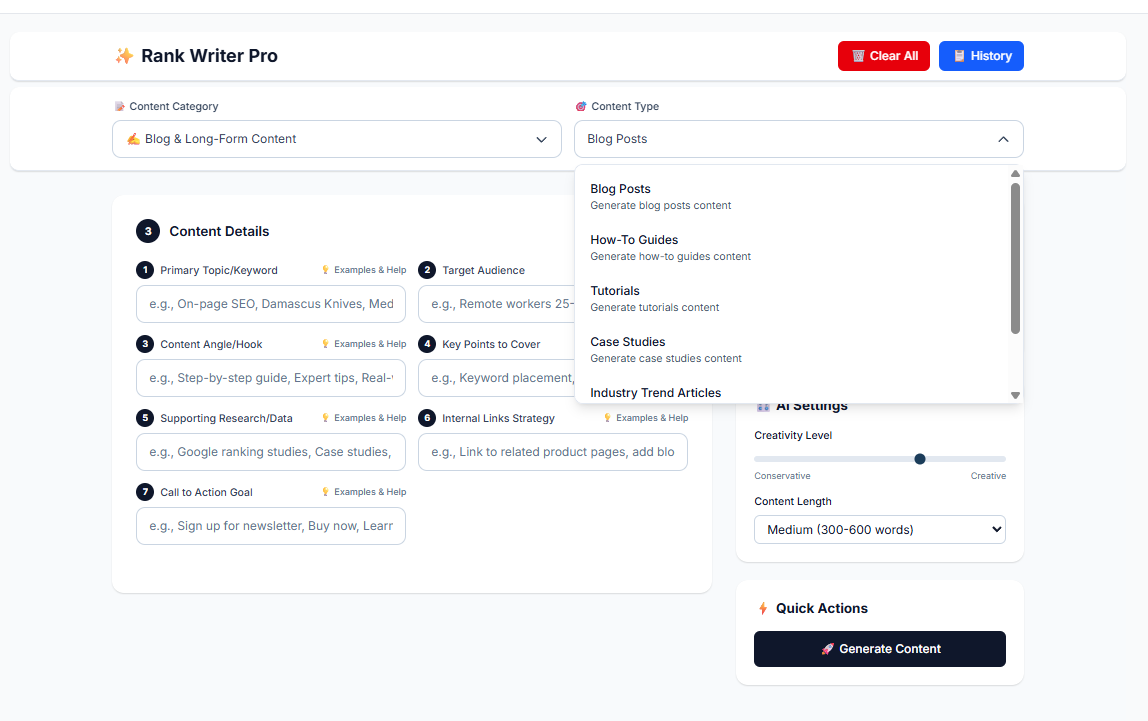
RankWriter Pro is an advanced content generation tool that helps streamline the process of creating engaging blog posts, tutorials, case studies, and industry trend articles. With its user-friendly interface and AI-powered features, it provides content creators and marketers with the ability to produce high-quality long-form content quickly and efficiently.
1. Selecting the Content Category
The first step in using RankWriter Pro is to choose the right content category. For generating blog posts and long-form content, select the Blog & Long-Form Content category. This section is optimized for content such as:
Blog Posts
How-To Guides
Tutorials
Case Studies
Industry Trend Articles
Listicles (Top 10/Best of)
Each of these content types serves a specific purpose, allowing you to create content that best fits your needs.
2. Choosing the Content Type
After selecting the category, the next step is choosing the appropriate content type. RankWriter Pro offers several options tailored to different types of content creation:
Content Type | Description |
Blog Posts | Ideal for general blog content like thought leadership or product reviews. |
How-To Guides | Step-by-step instructional content designed to help users complete a task. |
Tutorials | Detailed, hands-on guides focusing on practical learning experiences. |
Case Studies | In-depth analyses of real-world examples, showcasing success stories or challenges. |
Industry Trend Articles | Articles based on the latest developments, news, and trends within a specific industry. |
Listicles (Top 10/Best of) | Lists that rank or review products, services, or ideas, such as "Top 10 Best SEO Tools." |
This categorization ensures you pick the right format for your content goals.
3. Filling in Content Details
Once you've selected your content type, it's time to fill in the content details. RankWriter Pro requires several key inputs to generate tailored content. Here’s a breakdown of what to provide:
Primary Topic/Keyword
This is the core subject or keyword for your content. It could be something like "SEO for E-commerce" or "Best Damascus Knives."
Target Audience
Defining your audience helps RankWriter Pro tailor the content. For instance, if your target is eCommerce business owners, the content will be optimized to address their pain points.
Content Angle/Hook
This is where you define the unique angle of your content. You might want it to be a step-by-step guide or an expert tip based on industry knowledge.
Key Points to Cover
List essential topics or sections that must be included in the content. This could range from product features, SEO tips, or important case studies.
Supporting Research/Data
If you have any relevant research, statistics, or case studies, include them here. This will strengthen the authority of your content.
Internal Links Strategy
Include links to other relevant articles or product pages on your website. This not only helps SEO but also enhances user experience by providing more value.
Call to Action Goal
Decide what you want readers to do after reading your content. This could be something like "Sign up for a newsletter" or "Buy now".
4. AI Settings
RankWriter Pro offers flexibility with AI settings. You can adjust the Creativity Level and Content Length to match the tone and format you're looking for.
Creativity Level: Choose between Conservative (more structured) or Creative (more free-flowing) based on the tone and style you prefer.
Content Length: Select the appropriate word count for your piece, typically Medium (300-600 words) or a longer format if needed.
5. Generating the Content
Once you've filled in the necessary fields and set the AI parameters, hit Generate Content. RankWriter Pro will process all the inputs and create high-quality content aligned with your specifications. It's a fast, efficient way to produce well-structured and engaging material.
6. Review and Edit
After the content is generated, it’s crucial to review it. While RankWriter Pro does an excellent job generating content, you may want to refine certain sections or adjust the tone to better match your brand’s voice. Always ensure that the content aligns with your brand’s objectives before publishing.
Why Use RankWriter Pro?
Using RankWriter Pro for Blog & Long-Form content has several benefits:
Benefits | Details |
Efficiency | Quickly generate quality content, saving valuable time. |
Customization | Tailor the content to your audience and SEO goals. |
Consistency | Create consistent content to maintain a steady publishing schedule. |
SEO-Friendly | RankWriter Pro ensures that the content is optimized for search engines, helping your posts rank higher. |
Cost-Effective | Producing high-quality content quickly means fewer resources spent on content creation. |
By following these steps and using RankWriter Pro, you can effectively generate high-quality blog posts, tutorials, case studies, and more. The tool provides an excellent way to streamline content creation while maintaining consistency and relevance in your writing.