
Supercharge Your Online Store - Boost eCommerce Success with RankWriter Pro
A Step-by-Step Guide for Creating High-Converting Online Store ContentIn the world of eCommerce, content is the true salesperson. Every product description,...
A Step-by-Step Guide for Creating High-Converting Online Store Content
In the world of eCommerce, content is the true salesperson. Every product description, title, and landing page is an opportunity to attract, engage, and convert customers.
That’s where RankWriter Pro comes in — your AI-powered assistant designed to help you create professional, SEO-optimized, and conversion-focused content for online stores.
This guide will walk you through exactly how to use RankWriter Pro for the eCommerce Content category, from understanding its purpose to generating perfect content for your brand.
Step 1: Understanding the eCommerce Content Category
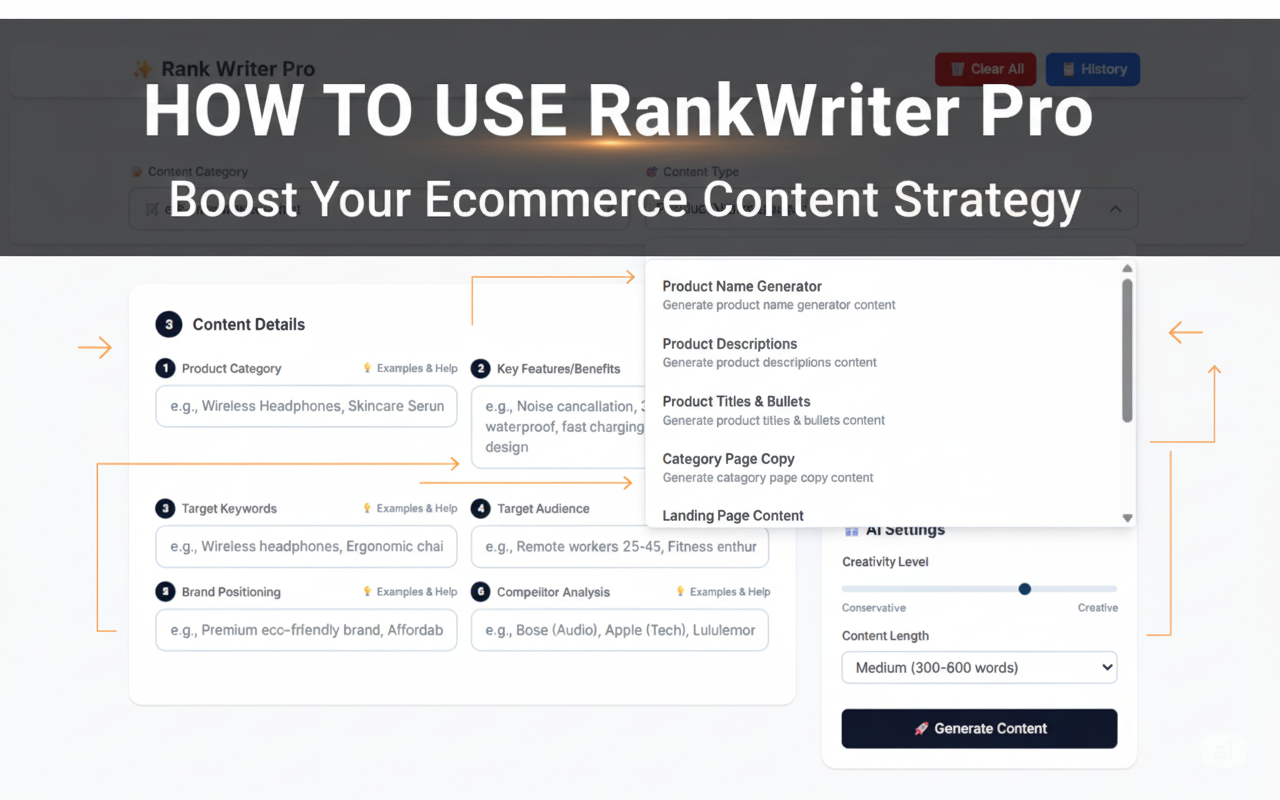
When you open RankWriter Pro, you’ll see multiple content categories. The eCommerce Content category is built specifically for online store owners, product marketers, and eCommerce content creators.
It helps you generate content for every part of your product listing or online store, including:
Product Name Generator – Create catchy and memorable product names.
Product Descriptions – Write persuasive descriptions that highlight features and benefits.
Product Titles & Bullets – Generate optimized titles and bullet points for listings on Shopify, Amazon, Etsy, etc.
Category Page Copy – Craft compelling text for category or collection pages.
Landing Page Content – Design attention-grabbing landing page copy to increase conversions.
Meta Titles & Descriptions – Write SEO-optimized metadata to improve search rankings.
Product FAQs – Automatically generate customer-focused questions and answers to increase trust and engagement.
Each of these content types serves a unique purpose — together, they create a strong, professional, and conversion-optimized eCommerce presence.
Step 2: Select the Right Content Type
Once you’re inside RankWriter Pro, you’ll see a list of content types under the eCommerce Content category.
Choose the one that matches your need.
For example:
If you’re launching a new product → Select Product Descriptions.
If you’re improving your store SEO → Choose Meta Titles & Descriptions.
If you want a new brand-style name → Try Product Name Generator.
Each content type will have specific input fields that guide RankWriter to generate exactly the kind of content you need.
Step 3: Fill in the Required Input Fields
RankWriter Pro works best when you give it detailed and accurate input.
You’ll see several fields under the “Content Details” section — here’s how to fill them properly:
1. Product Category
Example: “Wireless Headphones” or “Organic Skincare Serum”
This tells RankWriter what type of product you’re creating content for.
Be specific — instead of “electronics,” write “Bluetooth noise-canceling headphones.”
2. Key Features/Benefits
Example: “Noise cancellation, 30-hour battery, waterproof, fast charging”
List your product’s top selling points.
Think from the customer’s perspective — what makes your product stand out?
Tip: Use short phrases, separated by commas.
3. Target Keywords
Example: “Wireless headphones, Bluetooth earbuds, noise-canceling headset”
These help RankWriter optimize your content for SEO.
Use words that customers actually search for — tools like Google Keyword Planner or Rankar.ai Keyword Tool can help.
4. Target Audience
Example: “Remote workers aged 25–45” or “Fitness enthusiasts and travelers”
Tell RankWriter who you’re selling to.
This helps it adjust tone, language, and focus points to match your audience’s needs and motivations.
5. Brand Positioning
Example: “Premium eco-friendly brand” or “Affordable tech for everyday use”
Describe your brand personality or price segment.
RankWriter uses this to align your copy with your brand voice — whether that’s luxury, minimalist, youthful, or professional.
6. Competitor Analysis
Example: “Bose (Audio), Apple (Tech), Lululemon (Activewear)”
Mention your key competitors.
This helps RankWriter understand your market standard, competition level, and tone expectations.
It won’t copy competitors — it will outperform them by analyzing their style and optimizing yours.
Step 4: Generate Your Content
Once all fields are filled, click “Generate Content.”
RankWriter Pro will analyze your inputs and create polished, professional text instantly.
You’ll get multiple versions of your content (depending on your settings), each with slightly different tones or focuses.
Tip: Read each version carefully and choose the one that best fits your store or campaign.
You can also edit, refine, or re-generate as many times as you need.
Step 5: Optimize and Finalize
Before publishing, take a few moments to fine-tune your content:
Check Readability: Make sure your tone matches your brand’s audience (friendly, expert, luxury, etc.).
Add Keywords Naturally: Ensure your main keywords appear in the first 100 words, title, and meta description.
Review Formatting: For Amazon or Shopify listings, use bullet points for features and bold headings for clarity.
Include Emotional Triggers: Words like discover, upgrade, experience, and exclusive can boost engagement.
RankWriter makes editing easy — just click “Edit Output” or “Regenerate” to refine the tone, focus, or style.
Step 6: Export and Use
After finalizing your content, you can:
Copy it directly into your eCommerce platform (Shopify, WooCommerce, Amazon, etc.)
Download it for your content library or marketing team
Integrate with Rankar.ai tools to track keyword performance and SEO ranking
With this integration, you can manage your full content lifecycle — from creation to optimization — in one place.
Example: Creating a Product Description
Let’s say you’re selling “Wireless Noise-Canceling Headphones.”
You would enter:
Field | Example Input |
Product Category | Wireless Headphones |
Key Features/Benefits | Noise cancellation, 30-hour battery, Bluetooth 5.2, ergonomic design |
Target Keywords | Wireless headphones, Bluetooth headphones, noise-canceling headset |
Target Audience | Remote workers, travelers, music lovers |
Brand Positioning | Premium sound quality for professionals |
Competitor Analysis | Bose, Sony, JBL |
After generating, RankWriter might produce:
Product Title: SonicWave Pro – Wireless Noise-Canceling Headphones for Ultimate Comfort
Product Description:
Experience pure sound freedom with SonicWave Pro. Designed for professionals and travelers, these wireless headphones combine immersive noise cancellation with a 30-hour battery life. Enjoy crystal-clear audio, ergonomic comfort, and Bluetooth 5.2 stability — all in one sleek, modern design. Perfect for work, travel, and everyday listening.
You can then use this directly on your website, Amazon listing, or social media campaign.
Step 7: Combine with Other RankWriter Categories
To take your eCommerce strategy further, combine eCommerce content with other RankWriter categories:
SEO Content: Optimize your product pages with keyword-rich blogs
Marketing & Sales Content: Create email campaigns and ad copy promoting your new product.
Social Media Marketing: Generate engaging posts for Instagram, TikTok, or Facebook.
Growth & PR Content: Announce new product launches and collaborations.
This integrated content ecosystem ensures your entire digital presence speaks in one consistent, optimized brand voice.
Conclusion
RankWriter Pro transforms eCommerce content creation into a smart, automated, and strategic process.
With its powerful AI and structured input fields, you can produce professional, SEO-friendly, and conversion-driven content in minutes — not hours.
Whether you’re a store owner, digital marketer, or content manager, mastering the eCommerce Content category inside RankWriter Pro gives you a competitive edge in building product pages that sell and brands that stand out.