Inviting Your Team to RankOps — Roles, Permissions and Capacity
Bring your team into RankOps the right way: roles, granular permissions, and per-person weekly capacity so the workload board can balance assignments.
Why Inviting Your Team to RankOps Matters
Bring your team into RankOps the right way: roles, granular permissions, and per-person weekly capacity so the workload board can balance assignments.
Every Rankar-powered agency, in-house SEO team and solo freelancer needs an operating system. Spreadsheets, generic project tools and chat apps fall apart the moment a project crosses three clients or five team members. RankOps is the SEO-native operations layer that keeps everything visible — projects, tasks, goals, standups, capacity and AI insights — in one place.
This guide is built around real workflows we see inside the Rankar ecosystem. You'll learn the underlying framework, a step-by-step process you can run on a live project today, the common mistakes that quietly destroy team velocity, and the integrations that turn RankOps into a true command centre rather than just another dashboard. Read it once, then bookmark it — most teams come back to this guide in week two, when the first signs of operational friction appear.
The Core Framework
Three principles run through every effective use of RankOps: visibility, accountability, and rhythm. Visibility means every project, task and goal lives in one place — no separate spreadsheets, no buried Slack threads, no hidden client requests in a manager's inbox. Accountability means every task has a clear owner, a deadline, a priority and a one-line definition of done. Ambiguous ownership is the single most common cause of SEO retainer slippage. Rhythm means you check the dashboard at consistent intervals — daily, weekly, monthly — so risk gets surfaced before it becomes failure, not after.
- Use Owner, Manager, Specialist and Client roles. Use Owner, Manager, Specialist and Client roles — never give every user Owner permissions.
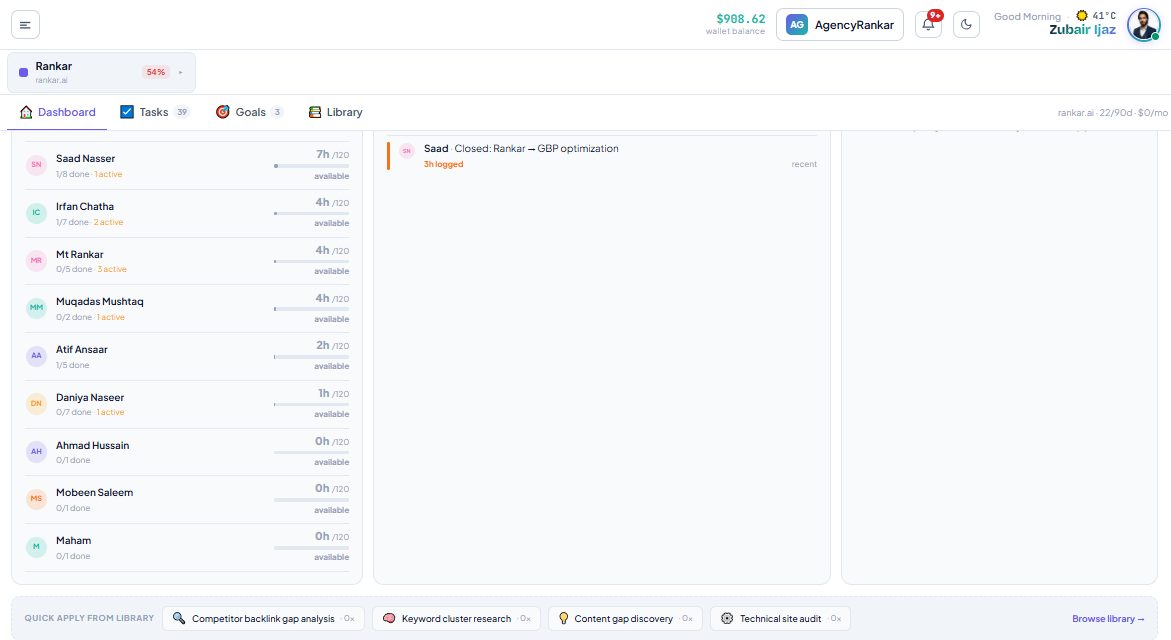
- Set weekly hours per person (default 30-40h) so capacity warnings actually mean something. Set weekly hours per person (default 30-40h) so capacity warnings actually mean something.
- Clients get a read-only role with access to dashboards but not the task creation backend. Clients get a read-only role with access to dashboards but not the task creation backend.
These principles are deceptively simple. The hard part isn't understanding them — it's applying them on a Tuesday at 3pm when a client emails a fire drill, a writer misses a deadline, and two team members are out sick. The whole point of RankOps is to make the principles automatic so they hold up under that kind of pressure.
Hold those three principles in mind as you work through the rest of this guide. Every feature in RankOps maps back to one of them — and so should every habit you build around the tool. If you ever find yourself doing something in RankOps that doesn't strengthen visibility, accountability or rhythm, it's probably the wrong habit.
How to Apply This Step by Step
The fastest way to internalise this material is to apply it on a live project today. Open RankOps, pick one project that needs cleaner operations, and follow the five-step sequence below. It takes about 30 minutes the first time and shrinks to under 10 minutes within a week.
- Open the project dashboard. Note Health %, Pace status, and the number of overdue tasks. Write these three numbers down — they're your baseline. If Health is below 60 or Pace shows "Behind", flag the project for the morning's deeper review.
- Triage the AI Daily Review. Action every insight that flags a workload imbalance, slipping goal, or stuck approval. Do this before any other work today. Each insight has a one-click action — use it. Don't open a new tab to think about it.
- Run the relevant Quick Apply playbook from the Library if the project is missing a key SEO motion — backlinks, content gaps, technical audit or keyword clusters. The playbooks drop a structured set of tasks, owners and deadlines into the project automatically.
- Reassign tasks so no team member is above 90% capacity. Use the workload board, not memory. Capacity overload is the single biggest cause of missed deadlines, and the board makes it impossible to miss.
- Push a clean standup to RankTalk at the end of the day so the team and the client have a written record of progress. The Standup button compiles the last 24h automatically.
Repeat the sequence every single working day for two weeks. By day ten you'll feel the rhythm; by day fourteen you'll be looking at metrics improve without doing any extra work — just removing friction from the work you were already doing. Most teams report a 30-50% reduction in stuck-in-approval tasks and a 20-30% reduction in overdue items within the first month.
Common Mistakes (and How to Avoid Them)
The tool can only do so much. Every mistake below is something we've watched smart teams make — including agencies that have been doing SEO for over a decade. Avoiding these five will put you ahead of most operators using any project tool, not just RankOps.
- Treating RankOps like a static to-do list. It's a living dashboard. Refresh it as the project changes — don't set it once and forget. The teams that get the most out of RankOps update task scope and reprioritise at least once a week.
- Skipping the AI Daily Review. The biggest single productivity unlock in RankOps is acting on AI insights within 60 seconds of seeing them. The insight is a finished decision waiting to be executed — don't downgrade it back into a thinking task.
- Letting Critical-priority tasks pile up. If more than 20% of open tasks are Critical, the word "critical" has stopped meaning anything. Force-rank ruthlessly. A task that's been Critical for three weeks is no longer critical — it's stuck.
- Ignoring capacity warnings. Burnt-out team members produce worse work, miss deadlines, and quit. Treat capacity warnings the way you treat ranking drops — urgent and actionable. Reassign work the same day the warning appears.
- Not connecting RankOps to the other tools. RankAudit, RankWriter, RankAIO and RankTracker all push events into RankOps. If you're not piping them in, you're working on a fraction of the data — and the AI Daily Review can only flag risks it can see.
Pro Tips for Power Users
Once you've internalised the basics, a handful of advanced moves separate operators who use RankOps fluently from those who just open it once a day. These habits compound over weeks — none of them feel huge on day one, but at the 90-day mark they're worth more than any single tool feature.
- Batch reviews into 90-minute blocks twice a week instead of touching the dashboard 30 times a day. Context-switching is expensive; concentrated review time is not.
- Use templates aggressively. Every recurring task — content brief, link prospect, audit follow-up — should be a saved template. Reusing structure is the single biggest time-saver in client-facing SEO.
- Tag tasks by client phase (onboarding, growth, optimisation, expansion). The same task carries very different priority depending on phase. Tags let you filter the view accordingly.
- Run a 30-minute weekly retrospective with the team using last week's standup posts as the agenda. What worked, what didn't, what to change. RankOps surfaces the data — the conversation is yours to have.
- Document playbooks the moment they work twice. If a workflow saved you time, capture it in the Library before you forget the details. Three months later you'll thank yourself.
Going Deeper — Resources and References
The principles inside RankOps are grounded in established operations and SEO research. For wider context, study how the broader industry approaches search workflows and team operations. Useful background reading: Google Search Central Google Search Quality Guidelines Search Engine Journal — Project Management Atlassian Agile Guide HBR — Managing Knowledge Workers.
These sources won't replace RankOps' own playbooks, but they'll help you understand why the playbooks are shaped the way they are — which makes you a better operator inside the tool. The combination of theoretical grounding and hands-on RankOps practice is what separates effective SEO operators from people who just have access to a fancy dashboard.
If you want to go even further, work through the rest of the Rankar Academy — every article connects back to a Rankar tool you can apply the same day you read it.
Apply This With the Rankar Toolkit
RankOps is the operating layer, but it's most powerful when paired with the rest of the Rankar suite. Spin up the relevant tools directly: RankOps • RankAudit • RankWriter • RankTracker • RankAIO • RankBridge • RankLinks • RankLocal • RankLaunch • RankSpy • RankUX • RankLead • RankTalk. Each tool pushes events into RankOps automatically — audit findings, draft content, ranking changes and backlink wins all land as actionable tasks in the project where they belong. The result is an operating system where no insight gets lost between tools and no task slips because someone forgot to copy it from one place to another.